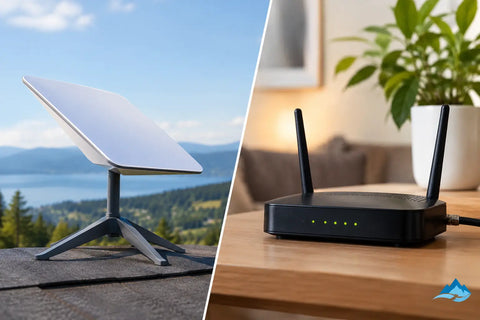
A remote home with no usable wired provider has a very different internet decision than a Manhattan office with cable already at the demarcation point. When comparing Starlink versus cable internet, the right answer is not simply the plan with the largest advertised download number. It is the connection that supports how the property actually operates - from video calls, cloud backups, and point-of-sale systems to streaming, surveillance, smart-home devices, and guest WiFi.
Starlink versus cable internet: the key differences
Cable internet travels over the coaxial infrastructure already serving many neighborhoods and commercial buildings. Starlink uses a low-Earth-orbit satellite network and a dish installed with a clear view of the sky. That fundamental difference affects speed consistency, latency, installation, service availability, and how the connection should be designed into the larger network.
Cable is often the more practical primary connection where it is available, properly provisioned, and supported by a reliable local network. Starlink is a major advantage for properties beyond the reach of cable or fiber, for temporary sites, and for locations where terrestrial service is unreliable or unreasonably expensive to extend.
Speed is only part of the picture
Cable plans can offer fast download speeds, often suitable for households with multiple 4K streams and busy offices with cloud applications. Performance varies by provider, plan, local network demand, and the condition of the building’s internal coaxial wiring. Upload speeds deserve special attention. Many cable tiers provide far less upload capacity than download capacity, which can affect off-site camera viewing, large file transfers, video conferencing, and cloud backup windows.
Starlink speeds can be very capable, especially for rural homes and small businesses that previously relied on DSL, fixed wireless, or legacy satellite service. However, performance can fluctuate based on network demand, weather conditions, obstructions, and service-plan priority. A clear sky view is not optional. Trees, rooflines, chimneys, and nearby structures can create interruptions that are noticeable during calls or remote sessions.
For a home, variable speed may be acceptable if the connection reliably supports everyday use. For a business that processes payments, runs cloud-based phones, or depends on real-time access to inventory and security systems, consistency may matter more than peak speed.
Latency affects real-time work
Latency is the delay between sending data and receiving a response. It matters most for voice and video calls, online gaming, remote desktop access, cloud applications, and transaction systems.
Cable generally delivers lower and more predictable latency than satellite service. Starlink’s low-Earth-orbit design performs far better than older geostationary satellite internet, but it can still experience more variation than a well-performing cable connection. That does not make Starlink unsuitable for video calls or business operations. It means the network should be evaluated honestly, particularly where a dropped call, delayed transaction, or interrupted VPN session has a real cost.
Reliability includes the equipment behind the service
Neither connection type is automatically immune to outages. Cable service can be affected by neighborhood infrastructure failures, damaged lines, power events, or congestion. Starlink depends on a correctly installed dish, unobstructed sky visibility, power at the property, and conditions across the satellite network.
The internet handoff is only one part of reliability. A low-quality router, poorly placed access points, overloaded WiFi, unmanaged switches, or aging cabling can make a strong service feel slow. This is common in larger homes, restaurants, warehouses, and offices where users blame the provider when the actual bottleneck is inside the building.
Where Starlink makes the most sense
Starlink is especially valuable where conventional broadband is unavailable, underperforming, or impractical to install. Think rural homes, estate properties, construction sites, remote offices, temporary event environments, and warehouses outside well-served corridors.
It can also work well as a backup connection. A business may use cable as its primary service and Starlink as a failover path for critical operations. With the right gateway and multi-WAN configuration, the network can switch connections when the primary circuit goes down. This approach is often more practical than accepting a full outage at a site that depends on cameras, access control, cloud software, phones, or payment terminals.
Starlink installation requires more planning than setting a small modem on a shelf. The dish location needs an unobstructed field of view, a stable mounting method, protected cable routing, and appropriate grounding and surge protection. At commercial sites, the installation should also account for roof access, future maintenance, building rules, and how the connection enters the network rack.
When cable internet is the better primary choice
If a reliable cable provider serves the address, cable is usually the stronger choice for a primary home or business connection. It is typically easier to install, does not need roof-mounted equipment or a clear-sky view, and can provide stable performance for dense, always-on usage.
Cable is a particularly sensible option for offices with many concurrent users, retail locations with cloud-based point-of-sale systems, and homes with heavy streaming, gaming, and smart-device usage. Before committing, verify the real upload speed, equipment fees, contract terms, data policies, and whether the provider offers a business-grade option with better support or service-level commitments.
The building’s existing wiring matters, too. Older splitters, damaged coaxial runs, and improvised connections can undermine cable performance. A clean service installation paired with structured low-voltage wiring, quality switching, and professionally placed WiFi access points gives the connection a much better chance of meeting expectations.
Cost should include downtime and installation
The monthly service price is only one line item. Cable may have lower equipment and installation costs when the connection is already available, while Starlink requires customer equipment and may require professional mounting and cable routing. Those upfront costs can be justified when Starlink is the only realistic high-speed option or when it protects a business from costly downtime.
For a home, consider what interruption is tolerable. If an outage means delayed entertainment, a single connection may be enough. If the property supports remote work, security cameras, smart access, and a busy household, a backup strategy can be worthwhile.
For a business, calculate the impact of even a few hours without connectivity. Lost sales, unavailable phone systems, inaccessible cloud platforms, and interrupted surveillance can quickly exceed the cost of a properly designed failover connection and battery backup.
The network design matters as much as the provider
A good internet service cannot compensate for weak internal infrastructure. The goal is to deliver the available bandwidth where it is needed, securely and consistently.
For larger residences, that may mean wired access points throughout the home, separate WiFi networks for guests and smart devices, and hardwired connections for entertainment equipment and offices. For commercial spaces, it may include managed switching, VLAN segmentation, secured staff and guest networks, rack organization, camera bandwidth planning, and cellular or satellite failover.
Starlink users should also plan for how remote access will work. Some applications, VPNs, camera systems, and hosted services may need specific configuration because satellite connections can use carrier-grade network addressing. A qualified network installer can select equipment and settings that support secure remote management without exposing the rest of the network.
Power protection deserves the same attention. A modem, Starlink router, gateway, switch, and WiFi access points all depend on electricity. A properly sized UPS can keep essential networking equipment online during short power interruptions and reduce the disruption caused by brief outages or generator transfer periods.
How to choose for your property
Start with the address, not the marketing claims. Confirm which wired providers actually serve the building and what upload speeds they deliver. If considering Starlink, assess sky visibility from the intended dish location rather than assuming a roof will automatically provide a clear path.
Next, identify critical uses. A family working from home may prioritize stable calls and strong whole-home WiFi. A restaurant may prioritize payment processing, guest WiFi separation, and camera uptime. A warehouse may need reliable coverage across a large footprint and secure access for operational devices.
Then decide whether the connection is primary, backup, or both. Cable plus Starlink can be a smart design where continuity matters. Starlink alone can be transformative where cable cannot reach. Cable alone can be the cleanest, most cost-effective setup in a well-served location.
The best decision is made at the system level: service availability, site conditions, network equipment, WiFi coverage, security needs, and tolerance for downtime. Wall Street Networks can evaluate those moving parts and design a clean installation that fits the property instead of forcing the property to fit a generic plan. A short site assessment before equipment is ordered can prevent months of weak coverage, unreliable calls, and avoidable service frustration.